
Controls

HOLLOW Roblox Controls, Menus and PC Keybinds

Last updated:

Look up an action key, find the panel you need, or adjust a displayed binding in HOLLOW.

At a glance

The default PC keys are Q to dodge, Z for FlashStep/Sonido, Left Ctrl to toggle sprint, F to block, and X to charge Spiritual Energy. Use N to meditate, U for World Travel, G to activate your weapon form, and J for Sensory Mode. Click the controller-shaped Menu icon at the top of the screen to open the radial menu. In Settings, select a displayed key to change it or use its row’s reset control; changes save automatically.

HOLLOW Roblox Controls, Menus and PC Keybinds — illustrated cover

Default PC Controls

Use these default bindings unless you have saved replacements in Settings.

Input Action
Q Dodge/dash
Z FlashStep/Sonido
Left Ctrl Toggle sprint
F Block
X Charge Spiritual Energy (Reiatsu)
N Meditate
U Open World Travel
G Activate your unlocked weapon form
J Enter Sensory Mode
M1 — left mouse button Basic attack with your equipped Attack entry or weapon
Number keys Select the corresponding hotbar entry

Selecting a hotbar slot and attacking are separate inputs. If Attack or your weapon is in slot 1, press 1 to select it, then use M1 to attack. For equipment checks and attacks that will not connect, see the combat guide.

Sensory Mode turns the view gray and reveals purple character auras and quest or service markers with distances in studs. Use the locations and World Travel guide to find your destination. For the route preparation and waiting involved after pressing N, see the meditation guide.
NPC, Soul and Evolution Inputs

Input When to use it
E Talk to an NPC when the interaction prompt appears.
Hold E As a Hollow, consume a soul. Stay close and hold until the interaction ring fills.
P Perform Soul Passage on wandering souls in the Soul Reaper tutorial. Follow a target’s displayed prompt when it differs; the rescued Kaito Ito uses E.
Ctrl+K Open the evolution confirmation in Hollow progression. Read the destination before choosing Yes; an Arrancar prompt confirms mask removal into that form.
R, T, C, V Use the abilities named beside those keys in your current skill display.

Check R, T, C and V again after changing forms or abilities. Their assignments can change, so use the current labels rather than assuming a move stays on the same key. The skills reference covers the skills available in each form.

Open the Radial Menu

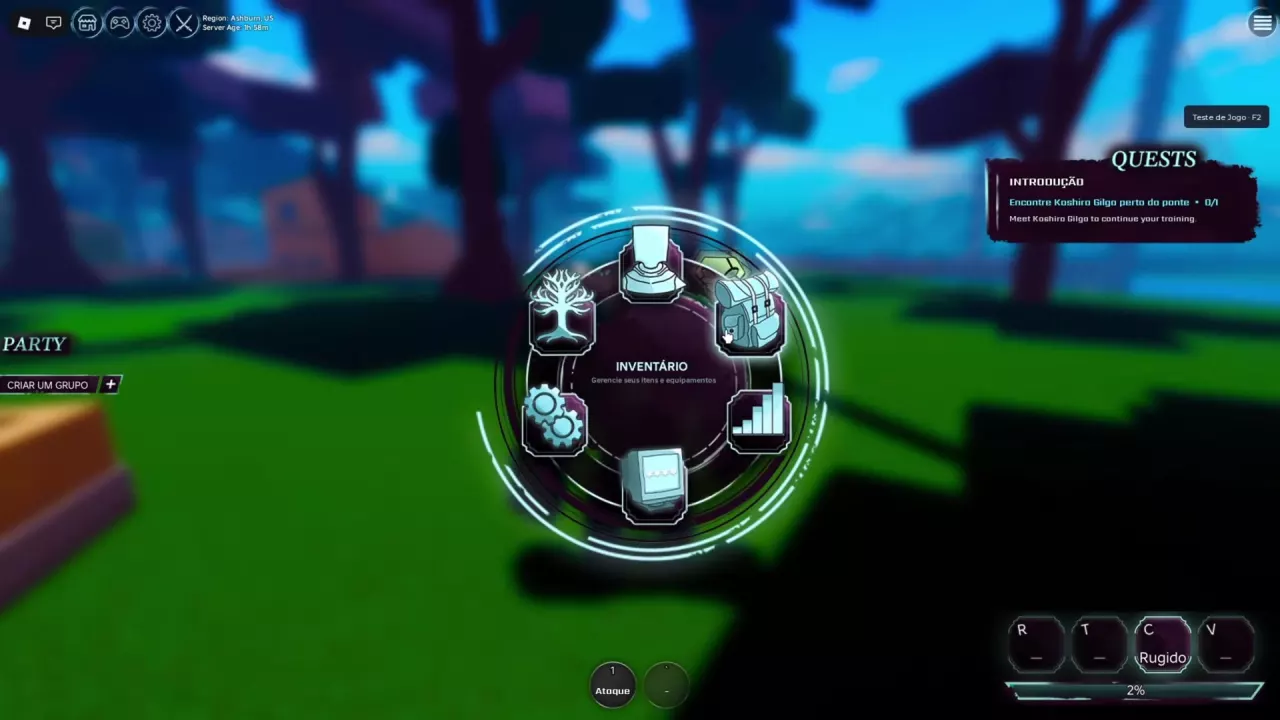
Click the controller-shaped Menu icon at the top of the screen, then select the panel you need from the wheel.

Panel Icon and position Use
Character Character bust at the top View your character profile.
Inventory Backpack at the upper right Manage items and equipment.
Stats Bar chart at the lower right View attributes and spend available stat points.
Skills Tree at the upper left Open the Skill Shop to view and equip skills.

In the Portuguese interface, Character is PERSONAGEM, Inventory is INVENTÁRIO, and Skills is HABILIDADES. For purchase requirements and hotbar setup after opening Skills, follow the skill buying and equipment guide.

HOLLOW radial menu with Skills at the upper left, Inventory at the upper right, and Stats at the lower right.

Change or Reset a Displayed Binding

In the game’s Settings panel:

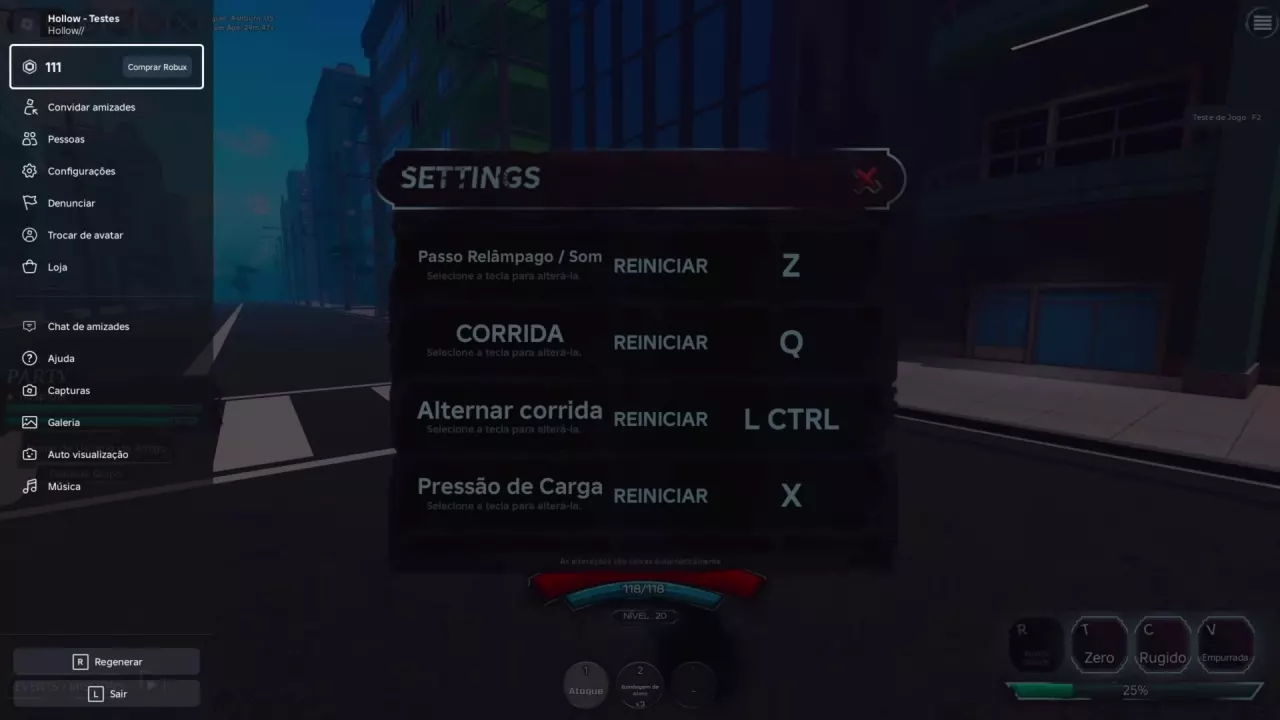
  1. Find the action you want to adjust. The displayed rows include FlashStep/Sonido, dodge/dash, toggle sprint, and charge pressure.
  2. Select the key shown beside the action to change its binding.
  3. To restore an action’s default instead, use the reset control on that same row. It is labeled REINICIAR in the Portuguese interface.

Changes save automatically. FlashStep and Sonido share one binding row.

HOLLOW Settings showing Z, Q, Left Ctrl, and X bindings with individual reset controls.

Search the archive

HOLLOW Roblox Races: Soul Reaper or Hollow?
HOLLOW Roblox Beginner Progression and Leveling GuideHOLLOW Evolution Guide: Gillian to Vasto Lorde and ArrancarHow to Get Shikai in HOLLOW: Squad, Spirit and ReleaseHow to Unlock Partial Resurrección in HOLLOW Roblox
HOLLOW Hollow Tutorial: First Meal to The HungerHOLLOW Soul Reaper Tutorial: Riku's Starter QuestsHOLLOW Roblox Quests: Objectives, Rewards and Turn-insHow to Get Shikai in HOLLOW: Squad, Spirit and Release
HOLLOW Soul Reaper Tutorial: Riku's Starter QuestsHow to Get Shikai in HOLLOW: Squad, Spirit and Release
How to Get Shikai in HOLLOW: Squad, Spirit and ReleaseHOLLOW Shikai List, Moves and Reroll Menu
How to Unlock Partial Resurrección in HOLLOW RobloxHOLLOW Roblox Resurrections: Weapons, Moves and RerollsHOLLOW Resurrection PvE Tier List for Event Farming
HOLLOW Roblox Clans: Roll Chances, Perks and Rerolls
HOLLOW Body Types: Bulky, Crawler and Winged
HOLLOW Roblox Skills: Requirements, Prices and EquipmentHOLLOW PvE Starter Builds and Skill Buying PrioritiesHOLLOW Roblox Stats and Stat Point Planner
HOLLOW Roblox Stats and Stat Point PlannerHOLLOW PvE Starter Builds and Skill Buying Priorities
HOLLOW PvE Starter Builds and Skill Buying PrioritiesHOLLOW Roblox Accessories: Reiatsu Gloves and BraceletHOLLOW Roblox Stats and Stat Point Planner
HOLLOW Resurrection PvE Tier List for Event FarmingHOLLOW PvE Starter Builds and Skill Buying Priorities
HOLLOW Roblox Controls, Menus and PC KeybindsHOLLOW Roblox Combat Guide: Basics and M1 Fixes
HOLLOW Roblox Combat Guide: Basics and M1 FixesHOLLOW PvE Starter Builds and Skill Buying Priorities
HOLLOW Meditation Guide: How to Start and Handle WaitingHow to Get Shikai in HOLLOW: Squad, Spirit and ReleaseHow to Unlock Partial Resurrección in HOLLOW Roblox
HOLLOW Roblox Events: Find Disturbances and Clear NodesHOLLOW World Boss Rewards and Arrancar InvasionHOLLOW Roblox Party System and Event Leader Rules
How to Open the Raid Gate in HOLLOW RobloxHOLLOW Roblox Materials: Fragments, Shards and Raid Costs
HOLLOW World Boss Rewards and Arrancar InvasionHow to Get Shikai in HOLLOW: Squad, Spirit and ReleaseHow to Unlock Partial Resurrección in HOLLOW Roblox
HOLLOW Roblox Locations, NPC Markers and World TravelHow to Open the Raid Gate in HOLLOW Roblox
HOLLOW Roblox Party System and Event Leader RulesHOLLOW Roblox Events: Find Disturbances and Clear Nodes
HOLLOW Roblox Accessories: Reiatsu Gloves and Bracelet
HOLLOW Roblox Consumables: Effects, Sources and Hotbar SetupHOLLOW Roblox Combat Guide: Basics and M1 Fixes
HOLLOW Roblox Materials: Fragments, Shards and Raid CostsHow to Open the Raid Gate in HOLLOW Roblox
HOLLOW Roblox Chests: Sources, Rewards and Mass OpeningHOLLOW World Boss Rewards and Arrancar Invasion
HOLLOW Roblox Currencies: Yen and Essence
HOLLOW Roblox Customization: Character Creation and Reiatsu ColorHOLLOW Body Types: Bulky, Crawler and WingedHOLLOW Roblox Clans: Roll Chances, Perks and RerollsHOLLOW Roblox Game Passes: Prices, Features and Faster Charge
HOLLOW Roblox Game Passes: Prices, Features and Faster Charge
HOLLOW Primordial Vasto Lorde Badge Requirements
HOLLOW Roblox Stats and Stat Point PlannerHow to Open the Raid Gate in HOLLOW RobloxHOLLOW Roblox Game Passes: Prices, Features and Faster Charge